

Auburn WireWorks
Pre-Order | ThermoVue Pro4 - 4" TouchScreen Belt Temp Gauge
Pre-Order | ThermoVue Pro4 - 4" TouchScreen Belt Temp Gauge
SKU:TVUE-PRO4
Couldn't load pickup availability
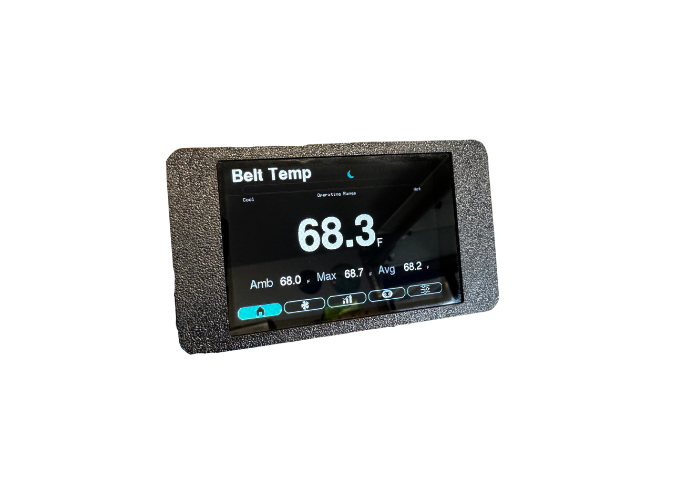
Bigger screen. More room for the details. ThermoVue Pro4 brings live drive-belt temperature to a larger touchscreen for your SXS or UTV. Larger supporting readings make ambient, peak, and average temperatures easier to read, with live belt temperature front and center on the Home screen. Add adjustable heat alerts, ride history, fine-tuned brightness, red Night Mode, and easy internet-update capability, and you get more than a bigger display: you get more useful information, with room to read it.
More info
More screen. More room to see what matters.
• Choose the larger-screen ThermoVue. Pro4 pairs a larger touchscreen with larger supporting information than Pro2's compact display. Supporting readings, ride statistics, and controls have more room, making the details easier to read.
• Keep live belt temperature front and center. The live belt-temperature readout is the centerpiece of Home. Temperatures display to one decimal place, making small changes visible as well as big heat climbs.
• Larger supporting readings, right where you need them. See larger ambient, peak, and average temperature readings alongside the main belt-temperature readout. You don't have to switch pages just to see how the current number compares with the ride so far.
• Get a visual feel for belt heat. A wide color bar moves from cool blue toward red as temperature approaches your chosen Hot Belt Alert. Change the alert temperature and the bar adjusts with it, keeping the visual cue relevant to your setup.
See the heat. See the ride behind it.
• A heat alert that's hard to overlook. Set the Hot Belt Alert using your belt manufacturer's guidance. When the displayed live temperature reaches that setting on Home, the belt-temperature reading alternates with a flashing HOT BELT message.
• Look beyond a single temperature. A color trend graph shows up to three hours of live temperature history. Follow the heat climbs and cooldowns, with the ride's average, lowest, and peak temperatures displayed alongside.
• Your last saved ride is there when you return. Switch between the current ride and the last saved ride to revisit its temperature graph, average, low, and peak. Pro4 periodically saves a ride snapshot for you, ready to view after restart.
• Keep the belt's longer-term record together. The Belt Life page brings together the installation date, accumulated monitoring time, a sampled average temperature, and Time In Hot Zone. It's a useful record of monitored heat exposure, not just the latest reading.
• A new belt gets a fresh record. Save the replacement belt's installation date right on the touchscreen to reset its monitoring-time, average-temperature, and Hot Zone totals. The new belt's record starts fresh instead of carrying over the old one's history.
A screen that suits your needs
• Fine-tune the brightness, not just high or low. Adjust daytime brightness in 5% steps from 10% to 100% to find a comfortable setting. Your choice is saved, so you don't have to set it again at every start.
• Jump straight to bright or dim. A quick MIN/MAX control takes the screen to its lowest or highest daytime brightness without repeatedly tapping through every step. Fine adjustment is still there when you want it.
• Night Mode is more than turning down the light. Tap the moon on Home for a subdued red-on-black interface at 10% brightness, with a pink Hot Belt alert to stand out from the normal red information. Tap the sun to restore daytime colors and your saved brightness.
• A familiar screen at the next start. Night Mode is temporary: every power cycle returns to Day Mode at your saved daytime brightness. The settings you want to keep stay saved; the nighttime view doesn't follow you into the next day.
Easy to use. Clear about what it's showing.
• Your information is a tap away. On-screen tabs take you directly to temperatures, ride history, the belt record, and settings. Scroll through setup on the touchscreen and choose Fahrenheit or Celsius for the numeric temperature readings and temperature settings.
• Set it your way and leave it that way. Pro4 remembers daytime brightness, temperature units, the Hot Belt Alert, and the belt installation date through power cycles. Your setup and saved belt record are ready when you turn it back on.
• A lost sensor connection isn't passed off as a live reading. A dedicated Sensor Fault screen identifies missing communication or invalid sensor data and shows the last recorded temperature and time since the last good update. Pro4 keeps checking the sensor and returns to the normal display once healthy readings are restored.
Easy updates, without an app
• Internet-update capability, right from your phone. Open Pro4's wireless update page in your phone's browser, select internet-connected Wi-Fi, and check for available official Pro4 releases. No app to install, no data cable to plug in, and no update file to find for the online option.
• You choose when an available update is installed. Review the release information and confirm before installation. Pro4 checks the signed online release, hardware compatibility, and downloaded file integrity, then shows progress through to the automatic restart.
• Already downloaded the official update? The manual wireless option lets you install the correct Pro4 update file through a local browser page from a phone or computer. Once you have the file, installation doesn't need internet access, an app, or a data cable.
In development: accessory cooler control
Accessory cooler control is in development for Pro4. It is not an active control feature of the current version.
ThermoVue Pro4 is a monitoring aid, not a guarantee against belt damage or a prediction of remaining belt life. The Belt Active total is accumulated monitoring time after the first valid sensor reading, not a measurement of belt rotation. Time In Hot Zone uses the configured Auto On temperature, separately from the Hot Belt Alert. Follow your vehicle and belt manufacturers' inspection, temperature, and operating guidance.
Pro4 manuals and downloadable update resources are marked coming soon on the documentation page. Contact ThermoVue for installation or troubleshooting help.
Share